
Why your Gboard clipboard disappeared
The Gboard clipboard history limit of about 1 hour applies to unpinned entries in its recent tray. Copying worked at the time; the recent item later expired. That is different from deliberately deleting a saved document.
Android’s system clipboard is another layer. Android 13 and later automatically clear the temporary clipboard buffer after a period, reducing exposure of copied material, including sensitive text. Google’s secure clipboard handling guide describes that system behavior. Pinning in Gboard does not turn the system buffer into permanent storage.
Compare the three places a clip can live
| Feature | Android System Clipboard | Gboard Clipboard Tray | Clipboard Saved History |
|---|---|---|---|
| Retention | Temporary current content; may be replaced or automatically cleared | Unpinned items clear after about 1 hour; pin individually | Saved entries have no 1-hour expiration |
| How content gets there | Copy in an app | Keyboard’s clipboard feature when enabled | Create or save inside Clipboard; background capture is not guaranteed |
| Finding older text | No searchable archive | Recent and pinned items; no full-text search across hundreds of snippets | Searchable saved clip list |
| Phone migration | Not a backup | No folder backup export; do not rely on pins surviving a keyboard or phone change | Pro folder export/import; import overwrites current clips |
| Mac and Web sync | No shared history service | No Mac or Web sync | Optional Pro sync to Android, Mac, and Web |
Solution 1: Pin the items you need in Gboard
- Open a text field so Gboard appears.
- Open Clipboard from the toolbar or tools menu. Enable the tray if prompted.
- Find the item before it expires, then touch and hold it and choose Pin. Some versions offer pinning through the edit control.
- Check that the item appears in the pinned section, then tap it when you need to paste.
Google’s Gboard copy-and-paste help also describes its pinned section. Exact controls can vary by version. Pinning is useful for a few short replies, but it is manual per item.
Gboard does not offer full-text search across hundreds of snippets, folder backup export, or Mac and Web sync. Pins can be easy to lose track of when switching keyboards or phones. Check them before a move and keep another copy of anything important.
Solution 2: Save reusable text and images in Clipboard
For a collection you expect to reuse next week, save entries in Clipboard by The 1 Studio. Saved clips have no one-hour expiration, remain searchable, and include text and images. The app has no ads. It works alongside Gboard, so you can continue typing with the keyboard you already use.
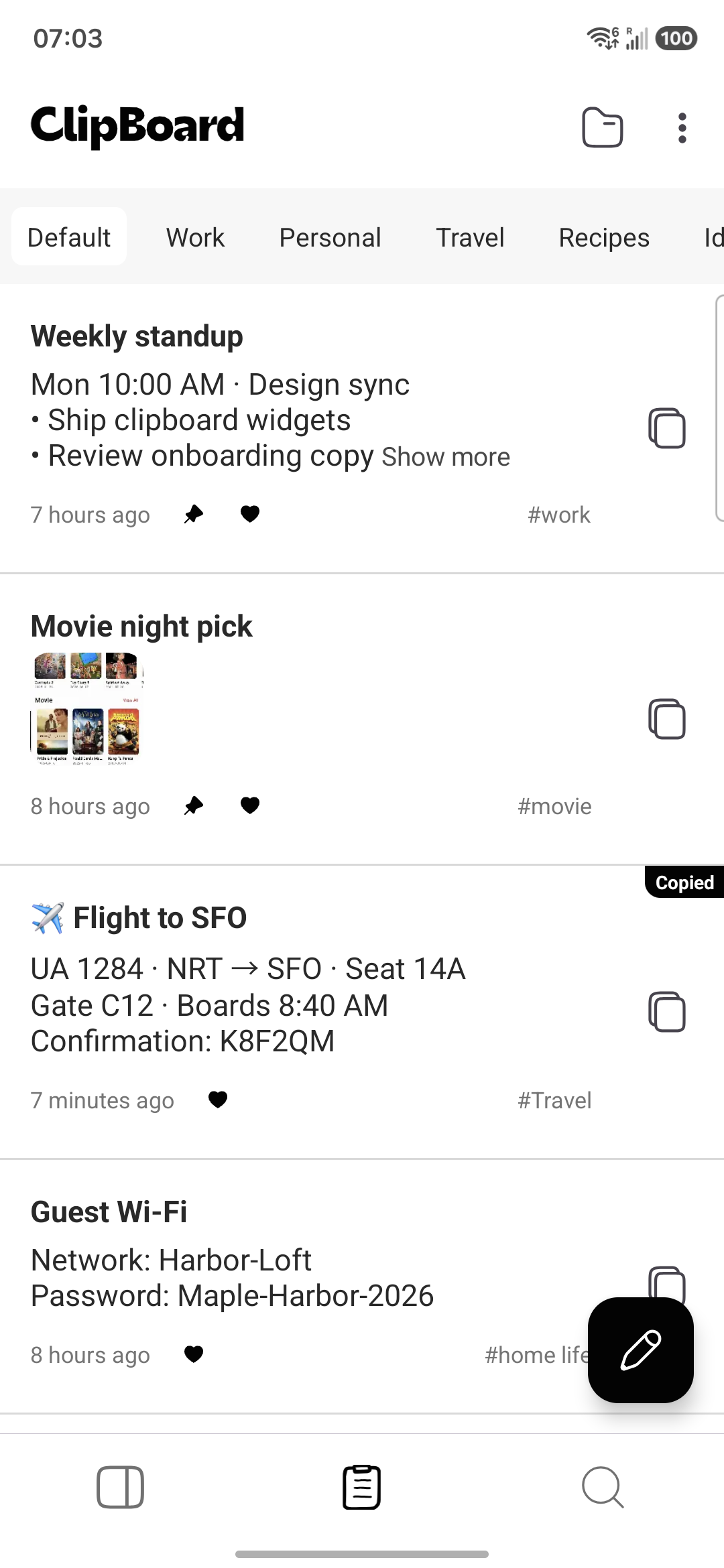
- Copy the useful passage from its source, then create or save a clip inside Clipboard.
- Confirm the entry is visible in the list and search for a distinctive phrase.
- When you need it again, open the saved entry, copy it, and paste into your destination.
- Use Pro sync if you also need that saved entry on Mac or the Web app.
To keep clipboard history forever on Android, plan for more than retention: saved entries can still be lost through deletion, clearing app data, or losing a phone. A list without a one-hour timer is useful, but a verified backup protects against a different problem.
What is free, and when do you need Pro?
Clipboard's free tier saves local text and image clips and includes on-device screen OCR. Create or save clips inside Clipboard and check the list. Copying in another app does not automatically sync content or guarantee background capture.
Clipboard Pro adds cross-device sync across Android, macOS, and the Web app, plus folder backup and restore. A clip must be created or saved in Clipboard to trigger sync. There is no native Windows or iPhone app.
For a recoverable folder copy, use Settings → Backups → Export data / Import data with Pro. Export copies the SQLite database and images to a chosen folder. Keep the complete export outside a phone you plan to reset. Import overwrites current clips; it does not merge collections. Preserve destination clips first and verify restored text and images before erasing the old phone.
Save text that you cannot select
Clipboard also includes free on-device ML Kit OCR through the Recognize screen Quick Settings tile and floating shortcut. Approve screen capture, check the recognized words, then choose Copy and save or Save only. It helps create a new clip from visible text; it does not retrieve expired Gboard entries.
If the item is already gone
Check Gboard’s pinned section first. If the item is missing there too, return to the source message, page, document, or screenshot. A newly installed history app cannot reconstruct copies it never saved. For a phone move, use the clipboard recovery and backup checklist before resetting the old device.
Frequently asked questions
Why does Gboard delete clipboard history after 1 hour?
Gboard’s clipboard tray clears unpinned items after about one hour by design. Pin an item before it expires if you want to keep it in that tray. Android’s temporary system clipboard also has separate automatic clearing on Android 13 and later.
Is there a setting to stop Gboard deleting clipboard history?
There is no hidden Gboard toggle that turns the one-hour limit into permanent storage. Pin individual entries, or deliberately save reusable content in a history app such as Clipboard.
How do I pin an item in Gboard?
Open a text field, open Gboard’s Clipboard panel from its toolbar or tools menu, and touch and hold the item to choose Pin. Some versions also expose pinning through the edit control. Pin before the item disappears.
Can I keep clipboard history forever on Android?
Saved Clipboard entries have no one-hour expiration, but forever is not a recovery guarantee. You must save them in the app and protect them against deletion, app data loss, and phone loss. Pro adds folder backup/restore and cross-device sync.
Can I recover Gboard clipboard items that disappeared?
If the item is no longer in recent or pinned clips, look for its source message, document, or screenshot. Installing a history manager afterward cannot reconstruct text it never saved.
Does pinning Gboard clips sync them to Mac or Web?
No. Gboard pinning is local keyboard storage, not Clipboard Pro sync. For Android, Mac, and Web access, create or save entries in Clipboard and use Pro. Folder export and import also require Pro, and import overwrites current clips.
Related articles
Keep a saved history you can check
Create or save useful entries in Clipboard. Pro adds cross-device sync and folder backup/restore.