
The short answer
- You only use Windows PCs: keep Ditto. It is free, mature, and does exactly what it says. Windows’ built-in Win + V history is a lighter option.
- You moved to a Mac: try macOS Tahoe’s built-in Clipboard history in Spotlight first, then add a clipboard app if you want a lasting, searchable list.
- You want snippets on Android and a computer: choose a cross-platform clipboard app that syncs saved clips, such as Clipboard.
What Ditto is (and why people like it)
According to its official site, Ditto is “an extension to the standard windows clipboard.” It saves each item placed on the clipboard so you can get it back later, and it handles text, images, HTML, and custom formats. You open it from the system tray or with a hotkey (Ctrl + ` by default), then double-click or press Enter to paste an item into the previous window.
Ditto is free and open source (GPL-3.0 on GitHub), and the project describes itself as local first: no login, no cloud, no telemetry. You can install it with an installer, a portable build, Chocolatey, winget, or from the Microsoft Store. For a Windows power user who wants every copy logged on one PC, it is hard to beat.
Where Ditto stops
- Windows only. There is no official Ditto for macOS, Android, or iOS. Be careful with look-alike apps in other stores that borrow the name.
- Built for the PC it runs on. Being local first with no cloud account is a privacy plus, but it also means Ditto is not designed to put your clips on your phone or a Mac.
- It logs everything you copy. That is the point of Ditto, and it is useful—but it also means passwords and one-time codes end up in the history unless you manage that yourself.
Ditto vs Clipboard at a glance
| Ditto | Clipboard | |
|---|---|---|
| Platforms | Windows | Android (Google Play), Mac (Mac App Store), Web app; native Windows app coming soon |
| How items get into history | Automatically stores each item you copy on Windows | Only clips you create or save inside the Clipboard app; copying in other apps does not add items automatically |
| Across devices | Not designed for phones or Macs | Clipboard Pro syncs saved clips across Android, Mac, and Windows (through the Web app) |
| Cost | Free, open source (GPL-3.0) | Free app with local history and no ads; Pro adds sync and folder backup and restore |
| Account | No login, no cloud | Local use without sync; sign-in needed for Pro sync |
These are different tools for different jobs. Ditto is a Windows clipboard logger; Clipboard is a list of the clips you decided to keep, available on your phone and your computer.
Ditto alternatives by platform
On a Mac
If your Mac runs macOS Tahoe or later, you already have basic clipboard history: press Command-Space, then Command-4 to open Clipboard history in Spotlight. It is good for recovering something you copied recently. Our guide to clipboard history on Mac walks through it. If you want a searchable list that lasts and that you can also reach from Android, a clipboard manager is still useful—see what to look for in a Mac clipboard manager.
On Android
Android remembers only your last copy. Your keyboard’s clipboard panel (Gboard or Samsung Keyboard) holds recent copies for a short time—Gboard deletes unpinned items after about an hour. Since Android 10, regular apps also cannot read the clipboard in the background, so a Ditto-style “log every copy” app is hard to build on a modern phone unless it is your keyboard. Our comparison of keyboard clipboards vs dedicated apps explains the trade-offs.
On Windows
Honestly, if you stay on Windows, Ditto remains an excellent choice, and Win + V is built in. If you also need your saved clips on Android or a Mac, you can open the Clipboard Web app in your browser today; a native Windows app is coming soon.
How Clipboard fits if you leave Windows-only workflows
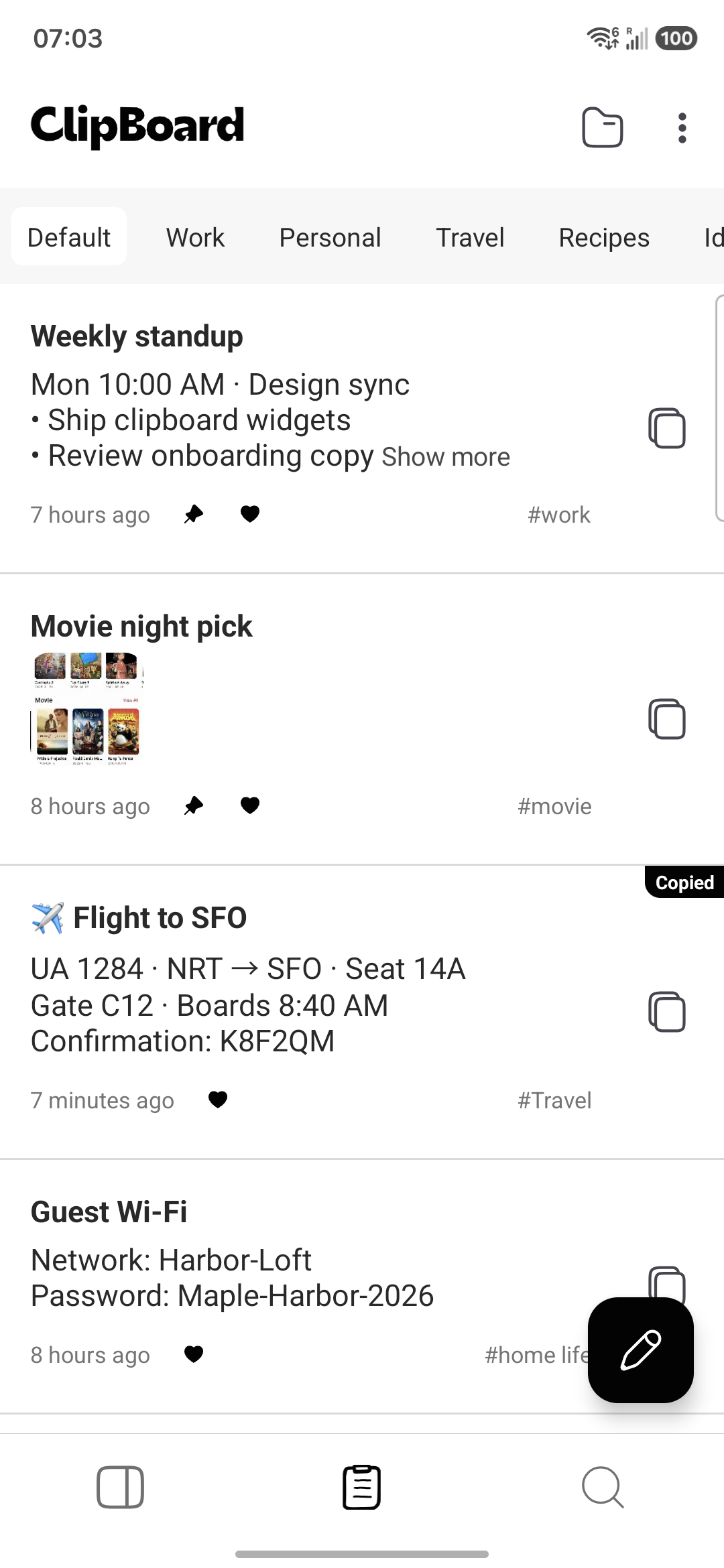
Clipboard is built for people who move between a phone and a computer. You keep text and image clips in one searchable list that stays until you delete it, on Android and Mac, with the Web app for any browser.
How it actually works: unlike Ditto, Clipboard does not record everything you copy. Copying text in another app does not automatically add it to Clipboard’s history, and it does not sync by itself. Items enter history—and Pro sync—only when you create or save them inside the Clipboard app. The result is a smaller, intentional list of addresses, replies, templates, links, and prompts you actually reuse.
Moving from Ditto: a simple plan
- Open Ditto and scan for the snippets you paste every week: addresses, replies, links, code, templates.
- Skip anything sensitive. Passwords and recovery codes belong in a password manager, not a clipboard list.
- Create those clips in Clipboard on your Mac or Android phone (or in the Web app on Windows).
- If you want them on every device, turn on Pro sync. Only clips saved in Clipboard sync.
- Keep Ditto on your Windows PC if you like it—the two can live side by side.
Frequently asked questions
Is Ditto available for Mac or Android?
No. Ditto is built as an extension to the Windows clipboard, and its official downloads are Windows-only (installer, portable build, Chocolatey, winget, and a Microsoft Store listing). There is no official Ditto app for macOS, Android, or iOS.
Is Ditto free?
Yes. Ditto is free and open source under the GPL-3.0 license. The project accepts donations but does not charge for the app.
What is the best Ditto alternative on Mac?
Start with what is built in: on macOS Tahoe or later, Spotlight includes Clipboard history (Command-Space, then Command-4) for recent copies. If you want a durable, searchable list of saved clips that you can also reach on Android, a cross-platform clipboard app such as Clipboard is a better fit.
Does Clipboard automatically record everything I copy, like Ditto?
No. Ditto stores each item you copy on Windows. Clipboard works differently: copying text in another app does not automatically add it to Clipboard’s history, and it does not sync by itself. Items enter Clipboard’s history—and Pro sync—only when you create or save them inside the Clipboard app.
Can I use Clipboard on Windows instead of Ditto?
A native Clipboard app for Windows is coming soon and is not available yet. Today, Windows users can open the Clipboard Web app in a browser; the Web app needs a plan and syncs with the Android and Mac apps. If you only use Windows PCs, Ditto or Windows’ built-in Win + V history may be all you need.
Can Ditto sync clips to my phone?
Ditto describes itself as local first, with no login, no cloud, and no telemetry. That is great for privacy on a Windows PC, but it is not designed to put your clips on an Android phone or a Mac.
Related articles
Keep your clips on every device
Use Clipboard on Android and Mac, or open the Web app on Windows. Save the text you reuse and search it anytime.